
Absence management: holiday, leave and sick days in a single panel
Discover absence management in Kinmu: request, approve and record holiday, leave and sick days from one clear, tidy panel.
Benefits
- Request, approve and record holiday, leave and sick days in one panel
- Your team asks for their time off and the manager decides with one click
- Set the rules for each absence type: days per year and minimum notice
- Create whatever absence types your company or your agreements need
- Every approved absence appears on the team calendar by itself
How many conversations about holiday get left half finished? A day of leave asked for by message, a sick day phoned in, a few days written into a spreadsheet only you keep up to date. When the time comes to sort out the calendar, you discover that two people are off the same week and nobody remembers who approved what.
Absence management is precisely what brings order to that. It is the process of requesting, approving and recording your team’s holiday, leave and sick days, and it works far better when it lives in one place. Instead of gathering scattered messages from three different channels, you have each request clear, on the record and visible at a glance. Everything in its place, with its status and its date.
What absence management is
Absence management is the process of requesting, approving and recording a company’s holiday, leave and sick days. It sounds simple, and it is when there is a good tool behind it. The difficulty appears when it is done by hand, split between email, phone messages and some spreadsheet that gets updated whenever someone remembers.
That split across channels is exactly what creates mistakes and small conflicts. A request that goes astray, days counted twice, a day of leave approved verbally that nobody can find afterwards. It is not anyone’s bad faith: it is that the information lives in too many places at once and a reliable picture becomes impossible.
In Kinmu we bring the whole process together in one accessible panel, where every request is clear and on the record. Your team asks from there, you decide from there and the information stays there, in order. So you go from chasing messages to checking a single place where everything adds up. And when someone asks about an absence from months ago, the answer is one click away, not in somebody’s memory.
Types of absence you can manage
Good absence management starts by allowing for every case that comes up in a real business. That is why, in Kinmu, you can manage holiday, different kinds of leave such as parental or marriage leave, and sick leave. Each has its own logic and can be set up with its own rules. You define the maximum number of days per year, the minimum notice needed to request it and whatever details make sense in your case. That way the tool supports how you work instead of imposing something rigid that does not fit your day-to-day.
And because we know no two companies are alike, you can also create whatever absence types your company or your collective agreements consider appropriate. If you need a specific kind of leave that does not come as standard, you add it and that is that.
How absence management works in Kinmu
It all starts when someone submits their request: a few days of holiday, a medical appointment, a one-off day of leave. It takes them seconds and, at that point, the request is recorded as pending, awaiting an answer. From that moment the request exists in the system with a visible status, so it is neither forgotten nor lost along the way.
Next, the manager receives a notification. They go into their space, where all the team’s requests are gathered, and they can approve or reject it, always with the option to leave a comment explaining the decision. Nothing is left hanging: every request has its place and a status both sides can see. The person who asked knows their request has arrived, and the person deciding has it to hand without hunting for it.
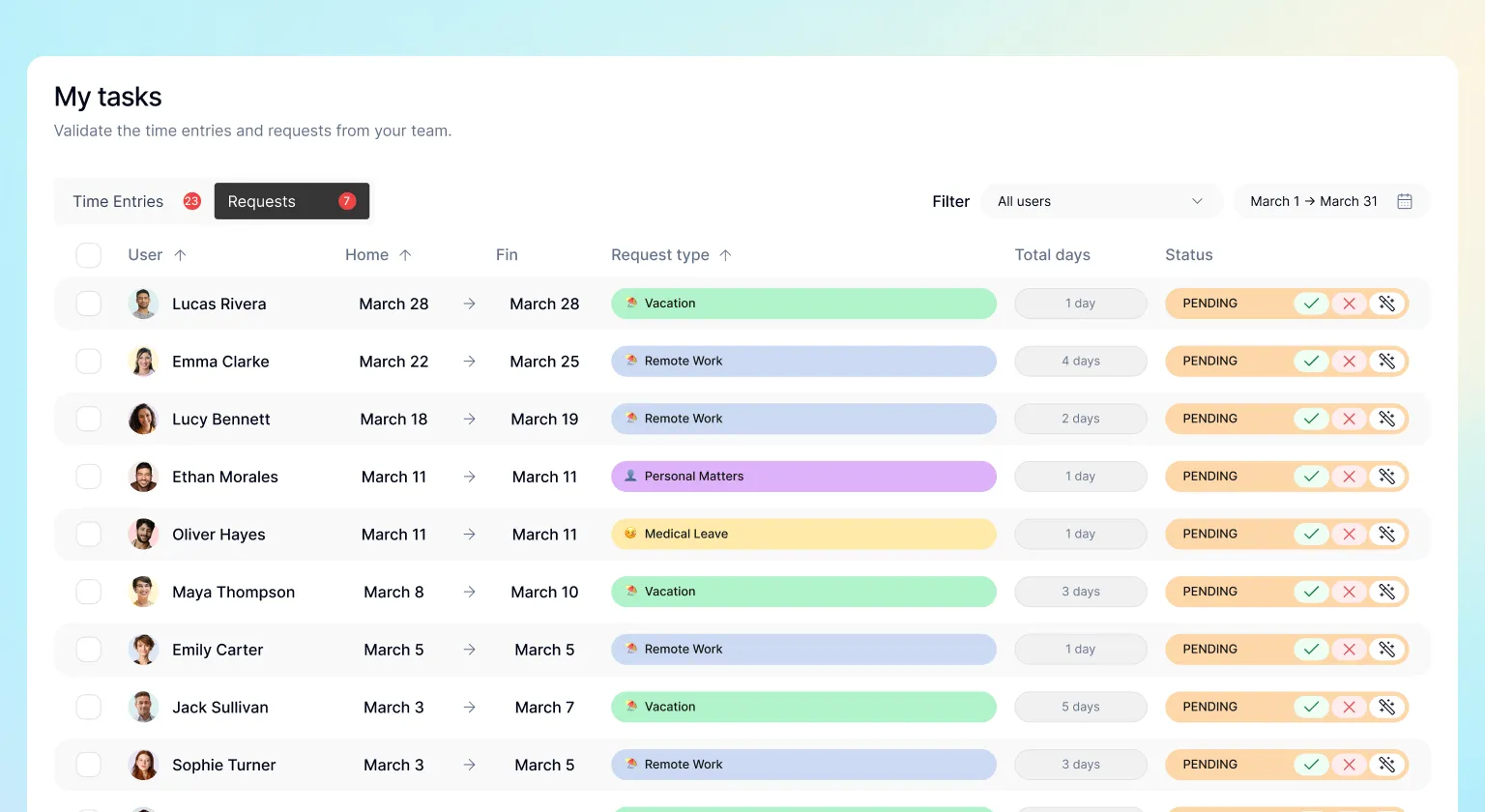
To help with the decision, Kinmu tells you whether the request meets the rules you have set, for example whether the person still has holiday available or has already used it up. It is a useful guide, but the final word is always yours: the tool informs, and you decide. Human judgement stays where it belongs.
From approval to calendar, with no steps in between
When you approve an absence request, the rest happens on its own. The absence appears automatically on the person’s calendar and, at the same time, on the team calendar. You do not have to note anything down anywhere else or tell anyone: approving and recording are the same gesture, and the information updates instantly. What used to be several entries in different places comes down to a single click that leaves everything in order.
And to close the loop, the person who made the request receives a notification with any change to it. They know whether it has been approved or not, and they know in good time, without having to ask. That clear two-way communication is what prevents misunderstandings and makes everyone trust the process from start to finish. Nobody is left waiting for an answer that never comes, and you do not have to repeat by message what the tool already communicates on its own.
Why centralise your absences in Kinmu
Bringing absence management together in Kinmu makes sense for almost any small business, but it really shows when the team grows or spreads out. We are thinking of shops, offices, workshops, clinics or field teams: in all of them, having holiday, leave and sick days in a single panel saves time and avoids needless friction. The more people and the more dates you have to fit together, the more you notice having one calendar that gathers it all.
The gain works both ways. Your team gains convenience, because asking for days off is as easy as filling in a request and waiting for the answer without chasing anyone. And you gain peace of mind, because every request is on the record, with its status and its history, ready to look up whenever you want.
Frequently Asked Questions
What is absence management?
It is the process of requesting, approving and recording employees' holiday, leave and sick days. Done by hand, over email or through messages, it creates mistakes and friction. Kinmu brings it together in one accessible panel where every request is clear and on the record.
What types of absence can I manage in Kinmu?
Holiday, different kinds of leave such as parental or marriage leave, and sick leave. Each has its own logic and the tool tells them apart so everything is properly classified. You can also create whatever types your company or your collective agreements call for.
Can I create custom absence types?
Yes. If you need a specific kind of leave that does not come as standard, you add it and that is that. Kinmu lets you create whatever absence types your company or your agreements consider appropriate, so the system fits your reality however particular it is.
Can I set rules for each absence type?
Yes. Each type is set up with its own rules: the maximum number of days per year, the minimum notice needed to request it and whatever details make sense in your case. That way the tool supports how you work.
How does an employee request an absence?
They submit their request in seconds: a few days of holiday, a medical appointment or a one-off day of leave. At that point the request is recorded as pending, awaiting an answer, and the manager gets the corresponding notification.
How does a manager approve or reject a request?
They receive a notification and go into their space, where all the team's requests are gathered. From there they approve or reject each one, always with the option to leave a comment explaining the decision. Nothing is left hanging.
Does Kinmu decide automatically whether an absence is approved?
No. Kinmu tells you whether the request meets the rules you have set, for example whether the person still has holiday left. It is a useful guide, but the final word always belongs to the manager: the tool informs and you decide.
What happens when an absence is approved?
The absence appears automatically on the person's calendar and, at the same time, on the team's. You do not have to note it down anywhere else: approving and recording are the same gesture, and the information updates instantly.
Does the employee get told the status of their request?
Yes. Whoever made the request receives a notification with any change to it, so they know whether it has been approved or not, and they know in good time, without having to ask. That clear two-way communication is what prevents misunderstandings.
Why bring absence management together in one panel?
Because it stops the information being scattered across emails, messages and spreadsheets. With everything in one place, each request is clear, on the record and visible at a glance. Your team gains convenience and you gain a reliable picture of who is away and when.


