
AI assistant for time tracking: ask in plain language
Discover Kinmu's AI assistant: ask about your clock-ins and absences in plain language and let it act for you, without navigating between screens.
Benefits
- Ask about your clock-ins and absences in plain language
- Request holiday, remote work or leave with a single sentence
- Check your balances and the status of your requests instantly
- Managers see who is in the office and who has already clocked in
- Your data is yours: it is not shared and it does not train outside models
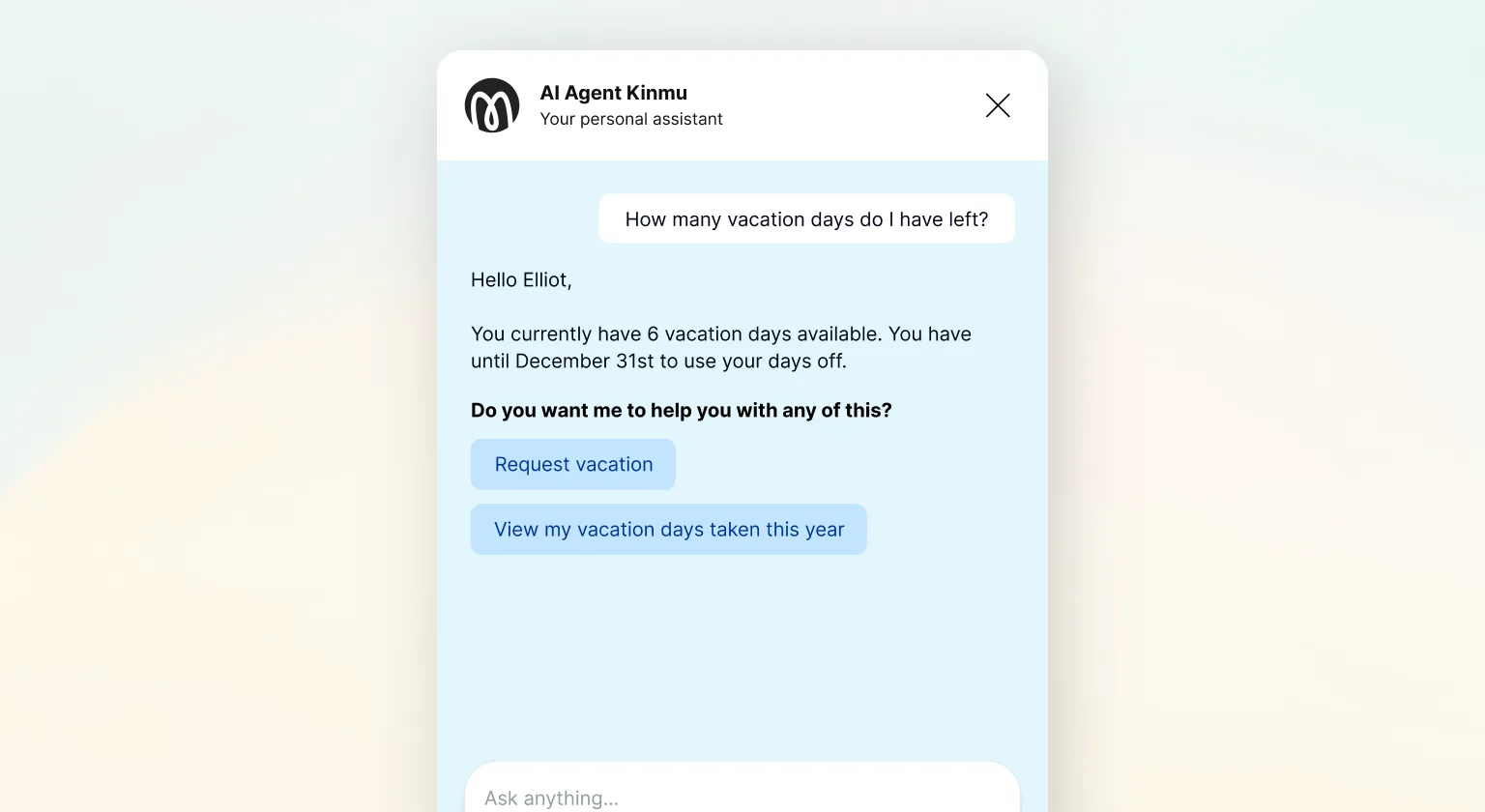
How many clicks does it take you to answer a simple question like “how many holiday days do I have left”? Usually too many. You open the app, look for the menu, go into a screen, filter by date and, by the time you find the figure, you have almost forgotten why you were looking for it. That small piece of friction repeats many times a week, across the whole workforce, and adds up to more time than it seems. Multiply it by a month and you will see why so many businesses are looking for a quicker way to settle these questions.
Kinmu’s AI assistant exists to take that friction out of the way. It is an intelligent assistant you talk to in plain language, the way you would write to a colleague, and it answers and acts straight away.
What Kinmu’s AI assistant is
Kinmu’s AI assistant is an intelligent assistant you can ask about your clock-ins and your absences using plain language. You ask it everyday things like “how many holiday days do I have left” or “how many hours have I worked this month”, and it answers instantly with the exact figure. You do not have to learn commands or remember where each function lives: it is like having someone to hand who knows your hours inside out and answers without keeping you waiting.
It is not a chatbot with canned answers that repeats stock phrases. It is a real agent, built into the app, that acts on your time records, creates requests and checks your balances and calendars in real time. In other words, it does not only tell you things: it also does things for you when you ask, and it does so on your real data, not on generic answers. The result is a tool that feels close at hand and fast, and that anyone on your team can use without being shown how.
What your team can do with the AI assistant
For employees, the AI assistant turns errands into something immediate. Want to ask for a few days of holiday? You tell it and it creates the request for you. The same goes for recording a remote working day or asking for leave or any other absence: one sentence is enough to get the request moving, with no need to find the right form or wonder where each thing is done.
And when what you want is information, you have that straight away too. You can ask about your balances, for example how many holiday days you have left, or check the status of a request you made a few days ago. Instead of looking for the answer across screens yourself, you simply ask for it and the assistant gives it to you, clear and current as of that very moment.
So the team gains the independence to sort out their own admin without depending on anyone, and you receive requests that are tidy and complete from the start.
What a manager can do with the AI assistant
As a manager, the AI assistant lends a hand exactly where it is most welcome: keeping track of the team. When a request comes in, it can review it and offer you a recommendation, for example whether it fits with that person’s available days. That said, we keep one rule very clear: the recommendation is there to help you decide with more context, but the final decision is always yours.
It also gives you a picture of the team in real time, just by asking. Questions such as “who is in the office now”, “who has already clocked in this morning” or “what absences does my team have this week” are answered instantly, with no reports to open and no data to cross-check by hand. It is the quickest way to know how the day is going without interrupting anyone or asking people one by one.
And there is one detail that saves a lot of time: arrival alerts. You can ask it for something as simple as “let me know when John arrives”, and the assistant sends you a notification as soon as that person clocks in. You stop keeping an eye out and it tells you instead, so you can focus on your own work knowing nothing will slip past you. That small piece of help, repeated every day, frees up attention you can give to what really matters, all without leaving the conversation with the assistant.
Your data is yours
When artificial intelligence comes up, it is only natural to wonder what happens to the information. Your data is yours. The AI assistant works with your company’s information solely so the service can function, and for nothing else. We administer that data so everything runs, but it does not belong to us: ownership is and remains yours at all times.
In practice that means two concrete commitments. The first is that your company’s information is not shared with third parties. The second is that it is not used to train outside artificial intelligence models either. What happens inside Kinmu stays inside Kinmu, serving your team and nobody else.
How the AI assistant fits into your day-to-day
The AI assistant is not a separate piece: it lives inside Kinmu and draws on everything else. It feeds on your clock-ins, your absences and your calendars, so its answers reflect what is really happening in your company at any given moment. It is your own information brought within reach of a sentence, and every answer it gives you is backed by real, up-to-date data.
That is why it fits just as well in a shop, in an office or in a team spread across locations. People short on time appreciate settling an errand in seconds, and anyone coordinating several people appreciates seeing the team’s status without chasing anyone. Artificial intelligence, applied well, does not add complexity: it takes it out of the way and leaves what you need in plain sight. Whatever their role, everyone finds something in the assistant that makes their day simpler.
Frequently Asked Questions
What is Kinmu's AI assistant?
It is an intelligent assistant you can ask about your clock-ins and absences in plain language, with questions like "how many holiday days do I have left" or "how many hours have I worked this month". It is built into the app, answers instantly and also acts for you: it creates requests and checks balances and calendars in real time.
Is it a chatbot with canned answers?
No. It does not repeat stock phrases. It is a real agent, built into the app, that acts on your time records, creates requests and checks your balances and calendars in real time. It does not only tell you things: it also does things for you when you ask in your own words.
What can an employee ask the AI assistant?
They can check their balances, for example how many holiday days they have left, or see the status of a request they made. Instead of hunting for the answer across screens, they ask for it and the assistant gives it to them, clear and up to date.
Can the AI assistant request holiday or leave for me?
Yes. You tell it you want a few days of holiday and it creates the request for you. It works the same way for recording a remote working day or asking for leave or any other absence: one sentence is enough to get the request moving, with no need to find the right form.
What can a manager do with the AI assistant?
They can ask it to review a request and offer a recommendation, see the team's status in real time and set up arrival alerts. Questions like who is in the office, who has already clocked in or what absences there are this week get answered instantly.
Does the AI assistant decide whether a request is approved?
No. It can review the request and offer a recommendation, for example whether it fits with that person's available days. But the final decision always belongs to the manager: the recommendation is help, not an automatic ruling.
Can I find out who is in the office right now?
Yes. You only have to ask. Questions such as who is in the office, who has already clocked in this morning or what absences your team has this week are answered instantly, with no reports to open and no data to cross-check by hand.
Can I set up arrival alerts?
Yes. You ask for something as simple as "let me know when John arrives" and the assistant sends you a notification as soon as that person clocks in. You stop watching the clock and it tells you at the exact moment instead.
What happens to my data when I use the AI assistant?
Your data is yours. The assistant works with your company's information solely so the service can function. Kinmu administers that data, but does not own it: ownership is and remains yours at all times.
Is my data used to train outside AI models?
No. Your company's information is not shared with third parties and is not used to train outside artificial intelligence models. What happens inside Kinmu stays inside Kinmu, serving your team and nobody else.


