
Banked hours: manage and compensate your team's overtime
Discover how Kinmu's banked hours help you manage overtime: pay it, compensate it with time off or distribute working hours flexibly.
Benefits
- Manage your team's overtime from one place
- Choose whether to pay for the hours, compensate them or distribute working hours flexibly
- The hour counter updates automatically with every clock-in
- Turn extra hours into time off for your team
- Adapt the distribution of working hours to your busy and quiet seasons
How many times have you reached the end of the month without knowing for certain how much overtime your team has worked? Overtime appears without warning and, when it is not managed properly, it ends up in manual calculations and the occasional uncomfortable conversation.
Banked hours are the Kinmu feature that brings order to all of this. They let you manage what happens to the hours each person works beyond their usual schedule, clearly and transparently.
What banked hours are and what they are for
Put simply, banked hours are a counter. Whenever someone works beyond their scheduled hours, that extra time is recorded in one place. This means you can see how much overtime each team member has accumulated at any time, without chasing down data or relying on anyone’s memory.
What we have seen in many businesses is that the difficulty is not overtime itself, but the lack of a system for recording it. When all the information lives in people’s heads, notebooks or corridor conversations, it is easy for something to get lost. And when something gets lost, it often creates a sense of unfairness for both managers and employees.
That is why we designed banked hours as a space for trust. The data is visible to everyone involved, updates with every clock-in and does not depend on interpretation. You decide how you want to handle those hours, and we make sure the total always adds up.
And here is the interesting part: not every business wants to do the same thing with those hours. Some prefer to pay for them, others compensate them with time off, and others distribute working hours differently throughout the year. Kinmu understands this, so banked hours adapt to the option that best suits you.
Overtime to pay at the end of the month
The first way to use banked hours is the most direct: overtime accumulates throughout the month and, when the month closes, the counter resets to zero. It is the ideal option when your business pays for those hours, because you have the exact figure right when you need it.
Throughout the month, every extra hour is added automatically. You do not have to write anything down or make calculations as you go: the system keeps the record for you. When it is time to review it, you open the information and see at a glance how much each person has accumulated, all based on your team’s actual clock-ins.
At the end of the period, the total resets and a new month starts from zero. This keeps each month closed with its own figure, without carrying over amounts from previous months or mixing concepts. You have clean, organised data ready to use however your business needs it.
Think how convenient it is to reach the end of the month with all the information prepared instead of reconstructing it against the clock. That peace of mind is exactly what we want: for managing overtime to stop being a pending task and become something that is handled effortlessly. And because every business has its own rhythm, you can check the total whenever you want, not only at the end of the month.
Turn overtime into time off
The second option is especially useful when you prefer to compensate extra effort with rest. Here, overtime is not paid: it accumulates as banked hours so that each person can later exchange it for days or hours off.
It works like a time savings account. Anyone who works extra hours stores them and, when it suits them, requests to use them. It is a clear incentive for the team because that extra effort becomes personal time, something people value greatly today. And because it is visible, everyone always knows how much time they have available.
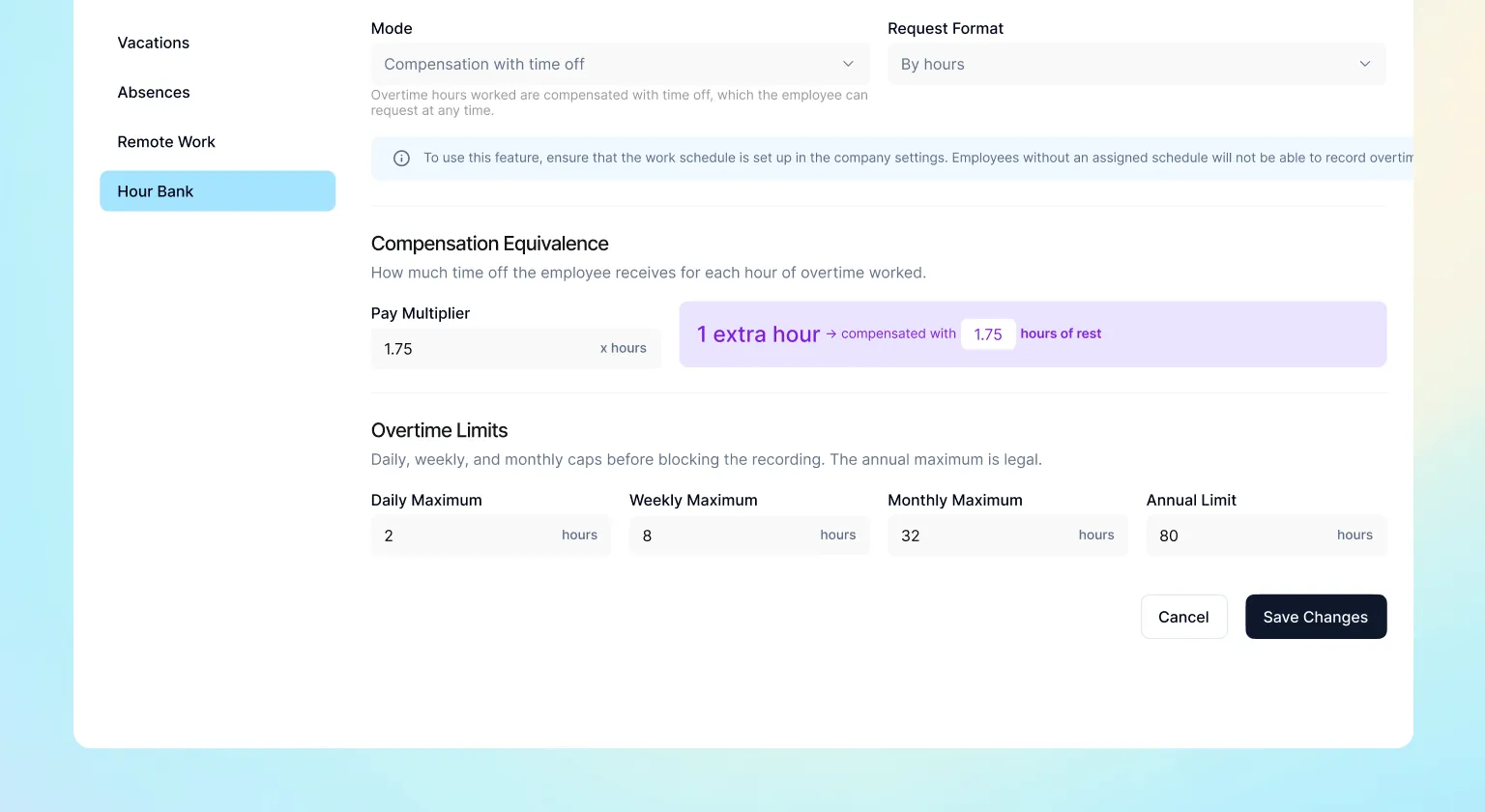
From your side, everything is recorded and visible. You know how many hours each person has saved and manage their requests from the same place where you receive the team’s other requests. This avoids keeping separate records and everyone having their own version.
When people see that their extra hours are recognised and turned into real rest, they approach their work differently. You also set the rules: you define how those hours accumulate and how they are requested, so banked hours fit the way your business works rather than the other way around. You set the framework, and the team moves freely within it.
Distribute working hours flexibly throughout the year
The third option is an uneven distribution of working hours. Instead of working the same number of hours every day, hours are distributed unevenly over a period, which can be a month, a quarter or the whole year.
It is a very useful option when your activity is seasonal. There are busy periods and quieter ones: with this option, longer working days during intense periods are balanced with shorter days when the pace slows. At the end of the period, the hours add up.
Banked hours make this balance possible. They record daily differences against the reference schedule and keep them under control, so you always know how the distribution is progressing. You work with a clear reference at all times, without separate spreadsheets or manual reviews.
At Kinmu, we believe managing overtime does not have to be complicated. That is why we designed banked hours so you can choose the option that best suits you (pay for the hours, compensate them with time off or distribute working hours flexibly) and set it up in a few minutes.
Frequently Asked Questions
What are banked hours in Kinmu?
It is a system that records and manages the hours each employee works beyond their usual schedule. In one place, you can see how much overtime each person has accumulated and decide what to do with it: pay for it, compensate it with time off or distribute working hours flexibly.
How do banked hours work?
Whenever someone works beyond their scheduled hours, that extra time is automatically added to the counter with every clock-in. You then choose how to handle it according to the option that best suits your business.
What options are there for managing overtime in Kinmu?
There are three: accumulate it to pay at the end of the month, compensate it with days or hours off, or apply an uneven distribution of working hours over a period. You choose the option you prefer.
Do overtime hours reset every month?
In the option designed for paying overtime, yes: the counter accumulates hours throughout the month and resets to zero when the month closes. This gives each month its own figure without carrying over amounts from previous months.
Can I compensate overtime with time off?
Yes. In compensation mode, extra hours are saved as banked hours and each person can later request to use them as time off. You manage the requests from the same place.
What is an uneven distribution of working hours?
It means distributing working hours unevenly over a month, a quarter or a year. Longer working days during busy periods are balanced with shorter days when activity slows down.
Does Kinmu calculate overtime automatically?
Yes. The system records every extra hour through clock-ins and keeps the total up to date at all times. You do not need to write anything down manually or maintain separate spreadsheets.
Can I check accumulated hours whenever I want?
At any time. You do not have to wait until the end of the month: open the information and see at a glance how many hours each team member has accumulated, with real, up-to-date data.
Are banked hours useful for seasonal businesses?
Very much so. The uneven distribution of working hours lets you extend working days during peaks in activity and shorten them when there is less work, while keeping hours balanced at the end of the period.
Is it difficult to start using banked hours?
No. You can set it up from the web in a few minutes, with no installations, and choose the option that best suits your business. The subscription is monthly and you can cancel whenever you want.


