
Digital kiosk: one clock-in point for your whole team
Discover Kinmu's digital kiosk: a single clock-in point on one device, without complex machines or biometric data.
Benefits
- Turn a computer, tablet or phone into your clock-in point
- It does not use biometric data, protecting your team's privacy
- Each person clocks in with a shared PIN, their own PIN or a QR code
- Create as many kiosks as you need and choose who can clock in
- Combine it with your company's other clock-in methods
Clocking in does not have to depend on expensive machines or complicated devices mounted on the wall. Imagine if your whole team could record their working hours from the same device, quickly and without having to use their personal phones. That is what Kinmu’s digital kiosk is all about.
We know that setting up a time tracking system can sometimes be daunting, especially if you think you need specific hardware or complicated processes. The digital kiosk was created to do exactly the opposite: provide a simple clock-in point everyone can use on a device you already have.
What Kinmu’s digital kiosk is
The digital kiosk is a clock-in method that turns a single device (a computer, tablet or phone) into the point where everyone on your team records their working hours. Instead of distributing terminals or asking each person to use their phone, you have one shared place to clock in that is clear and accessible to everyone.
The best part is that you do not need anything complex. You can forget bulky machines and technical installations: all you need is a connected device. This makes it ideal for an office, warehouse, shop or workshop, where it often makes no sense for everyone to clock in from their own phone.
Kinmu also believes in non-intrusive clock-in methods. The digital kiosk does not use biometric data: nobody has to scan their fingerprint or face to record their start time. We use simple, respectful systems because we believe clocking in should be convenient while also treating everyone’s personal information with care.
And because every business is different, the kiosk adapts to your reality. You can use it as the only method or combine it with other ways of clocking in, so each person can use the option that suits them best. We like the app to adapt to you, not the other way around.
How to set up the digital kiosk
Setting up the digital kiosk is very simple, and you control everything from your administrator profile. From there, you can create as many kiosks as you need: one for each location, department or workplace, depending on what suits you at any given time.
Next, you decide who can clock in at each kiosk. You invite the people you want, and only they appear as available at that point, which keeps you in control of who records their working hours and where. You choose the setup that makes sense for your organisation.
The next step is choosing the identification method. You can use a shared PIN, an individual PIN for each user or a QR code. This lets every business find the right balance between convenience and control, and we will add new methods very soon to give you even more options.
Once configured, we generate a URL that you open on the device you prefer. That link turns any computer, tablet or phone into your clock-in point, without installations or complications. Leave it open, and the kiosk is ready for your team to start using it.
From then on, recording start times, finish times and breaks works exactly like Kinmu’s other methods. In fact, you can combine the kiosk with other ways of clocking in at your business: every record arrives in the same place and is managed together.
Benefits of the digital kiosk
The main benefit of the digital kiosk is its simplicity. You can set up a professional time tracking system in minutes, without investing in hardware or relying on a technician. You use a device you already have and turn it into a reliable, always-available time tracking tool.
It also gives your team peace of mind. Because it does not use biometric data or require anyone to install anything on their personal phone, clocking in is convenient and respectful. Each person records their working hours in seconds with a PIN or QR code and gets on with their work.
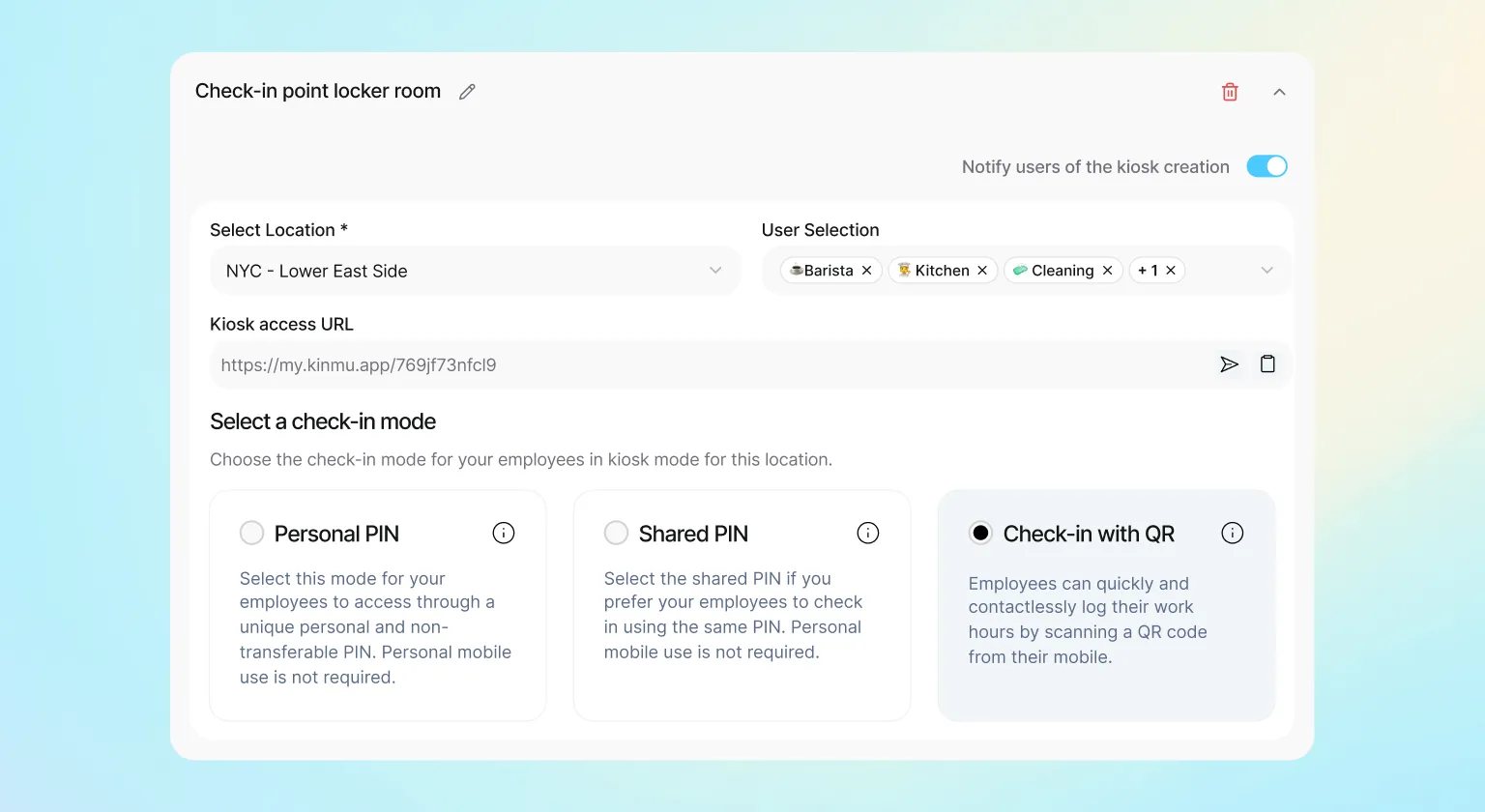
Another major advantage is flexibility. You create the kiosks you need, choose who clocks in at each one and combine this method with others within the same business. This lets you adapt clocking in to the way each team works instead of imposing a single method on everyone.
And, of course, everything is centralised. Kiosk clock-ins join all the other records in one place, where you can check the information whenever you want and generate reports with one click. You get a clear view of your team without any extra effort.
There are savings too. Because you do not buy terminals or pay to maintain specific devices, you reduce costs from day one and can dedicate that budget to what really helps your business grow.
Ideal use cases for the digital kiosk
The digital kiosk is especially useful in environments where several people share the same workplace. Think of a shop, restaurant, workshop, warehouse or reception area: in all of them, a shared clock-in point is much more practical than asking each person to clock in from their phone.
It is also an excellent solution for teams where not everyone has a company phone or wants to use their own for work. With the kiosk, anyone can clock in from the shared device naturally and without inconvenience. Nobody is left out for not having the right device.
And it works equally well in offices where many people arrive at the same time. Place a tablet in reception, each person enters their PIN or scans their QR code, and their working hours are recorded instantly, smoothly and without queues or waiting.
At Kinmu, we believe clocking in should be easy for everyone. That is why the digital kiosk gives you a simple clock-in point, without complex machines and with respect for your team’s data.
Frequently Asked Questions
What is Kinmu's digital kiosk?
It is a clock-in method that turns a single device (a computer, tablet or phone) into the point where the whole team clocks in. It does not require complex machines, does not use biometric data and means each person does not have to use their personal phone.
Which devices does the digital kiosk work on?
Any computer, tablet or phone. Simply open the URL generated by Kinmu on the device you prefer, and that point is ready for your team to clock in, with no installation required.
Does the digital kiosk use biometric data?
No. Kinmu uses non-intrusive methods, so the kiosk identifies each person with a PIN or QR code. Nobody has to scan their fingerprint or face to record their working hours.
How do I set up a digital kiosk?
From your administrator profile, create the kiosk, invite the people who can clock in there, choose the identification method and generate a URL. Open that link on the selected device and the kiosk is ready.
How many kiosks can I create?
As many as you need. You can have one per location, department or workplace, depending on what suits you, and manage them all from your administrator profile.
Which identification methods does the kiosk support?
You can choose between a shared PIN, an individual PIN for each user or a QR code. We will also add new methods very soon.
Can I choose who clocks in at each kiosk?
Yes. When setting it up, you invite the people you want, and only they appear as available at that point. This keeps you in control of who records their working hours and where.
Can I combine the kiosk with other clock-in methods?
Yes. You can use the kiosk as the only method or combine it with other ways of clocking in at your business. All records arrive in the same place and are managed together.
Do I need to buy special hardware?
No. The digital kiosk uses a device you already have, without bulky machines or technical installations. All you need is a connected computer, tablet or phone.
What types of business is the digital kiosk ideal for?
Workplaces where several people share the same space: shops, workshops, warehouses, restaurants or reception areas. It is also ideal for offices where many people arrive together or teams without company phones.


