
Team calendar: see where everyone is at a glance
Kinmu's team calendar shows you at a glance who is in the office, who is working remotely and who is on holiday. No need to ask.
Benefits
- See who is in the office, who is working remotely and who is off
- Check the team's holiday and absences at a glance
- Fewer interruptions: the answer to where someone is is already there
- It updates itself from clock-ins and approved requests
- Plan meetings and deadlines with real information about your team
How does the team calendar work in Kinmu?
Step by step
Read the transcript
Who's in the office today? Who's off on Friday? That question interrupts your team every single day. Kinmu answers it in one screen, the Team Calendar.
Here you see your team day by day, with no spreadsheets to cross-check and nobody to ask. At a glance you can tell who's in the office, who's working from home and who's on leave. Several offices? Filter by location and by team, and keep only what matters to you.
Move between months and plan meetings and deadlines knowing who you can count on.
And you never update it by hand. It builds itself from clock-ins and approved absences.
The whole team can check it too, so the information stops living in just a few heads. Next time someone asks who's in today, the answer will already be on screen.
So now you know. Kinmu's team calendar tells you who's in and where.
“Where is Mario today?”, “who is working from home this week?”, “wasn’t Lucía on holiday?”. If those questions sound like your day-to-day, you are not the only one they happen to. Knowing where each member of the team is, without having to cross-reference three different documents, is worth its weight in gold.
Kinmu’s team calendar exists for exactly that. It is a shared calendar where, at a single glance, you see who is in the office, who is working remotely and who is on holiday. No questions, no message chains and no chasing anyone down the corridor.
What Kinmu’s team calendar is
The team calendar is a shared space that reflects where everyone in your company is. Instead of having the information spread across spreadsheets, emails and passing conversations, you bring it together in one place that anyone can check whenever they need to.
The idea guiding us is a simple one: that the answer to “where is everyone?” should always be in plain sight. You open the shared calendar and, without asking anyone, you know who is working today, where they are working from and who is away. The information stops living in the heads of a few people and becomes available to the whole team at any moment.
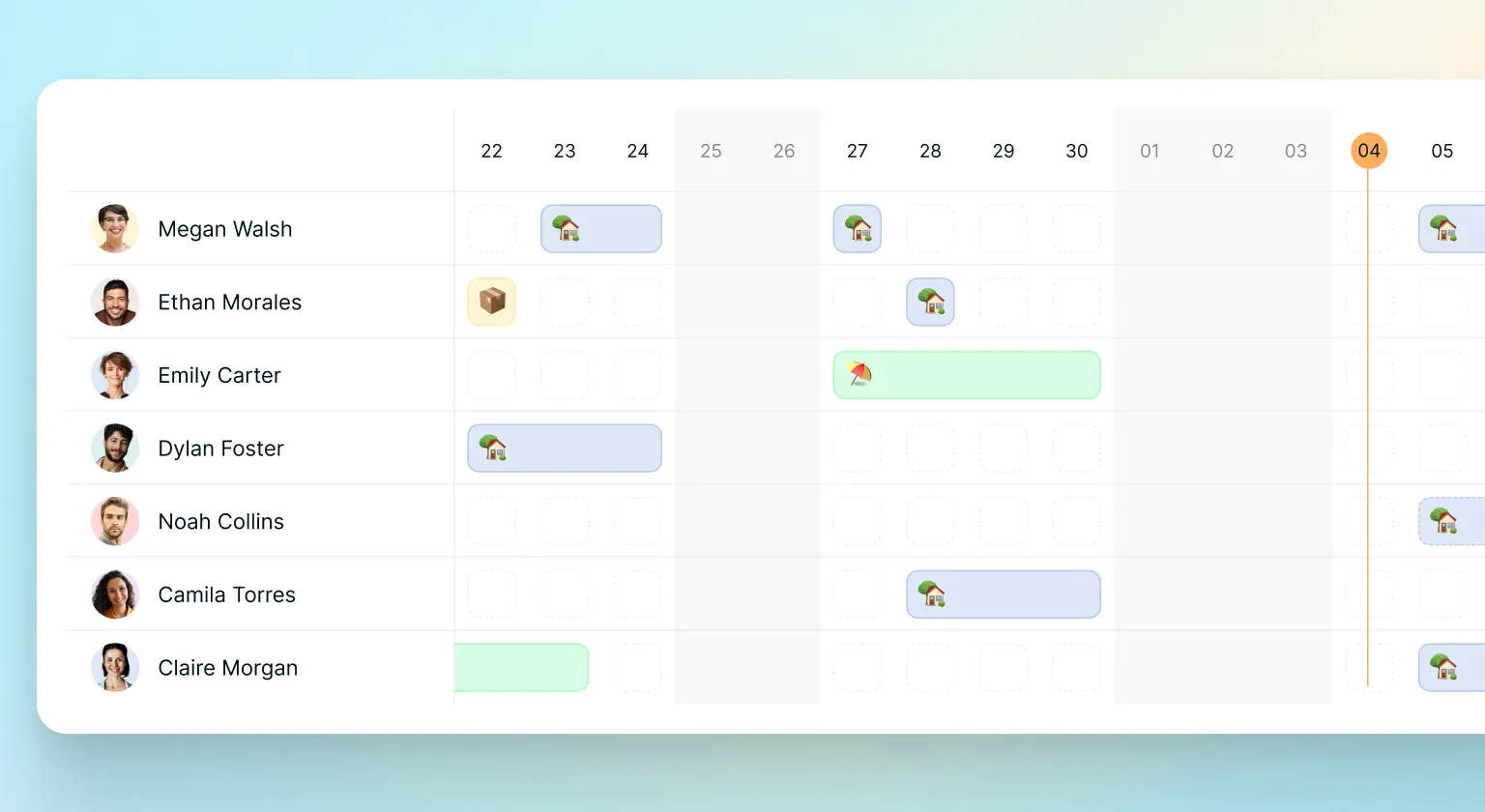
This may look like a small detail, but it changes a lot day to day. A good share of the interruptions in many businesses come from questions that could be answered with a single glance. With a clear team calendar, those questions resolve themselves and the work flows without breaks.
And the best part is that it does not add work for anyone. The shared calendar draws on the information you already manage in Kinmu, so it stays up to date without you having to maintain it by hand every morning. You just look, and the picture of the team is always ready, with no extra work for anyone and no room for forgetting.
The team calendar suits businesses of any size and sector. Whether you have a small team in a shop or a workforce split between the office and home, the need to know where everyone is is the same, and so is the answer.
At Kinmu we believe coordinating a team should be simple and transparent. That is why the team calendar shows you, at a single glance, who is in the office, who is working remotely and who is on holiday, with no questions and no documents to cross-reference.
Frequently Asked Questions
What is Kinmu's team calendar?
It is a shared calendar that reflects where everyone in your company is. At a single glance you see who is in the office, who is working remotely and who is on holiday, without having to cross-reference several documents or ask anyone.
What can I see in the shared calendar?
Your team's presence gathered on one screen: who is working in the office, who is doing so from home and who is on holiday or otherwise away. Days off too, so you know who you can count on each day.
Does the team calendar show who is working remotely?
Yes. It tells apart at a glance who is in the office and who is working remotely that day. It is very useful with hybrid arrangements, because you plan meetings and tasks knowing in advance where each person is.
Does holiday appear on the team calendar?
Yes. When a holiday or absence request is approved, it shows up on the calendar. That way the whole team knows who will be away and when, and you avoid planning deadlines for days when key people are off.
Do I have to update the calendar by hand?
No. The calendar draws on the information you already manage in Kinmu, such as clock-ins, work schedules and approved requests. It keeps itself current without you having to update it every morning.
Who can see the team calendar?
It is a shared calendar, meant for the team to consult. The information stops living in the heads of a few people and becomes available to everyone, with the kind of transparency that improves coordination.
How does the calendar help reduce interruptions?
When anyone can see who is where, the "are you in the office today?" messages stop being needed. The answer is already in plain sight, so people keep their focus and you win back many hours over the course of a week.
Is it useful for teams that mix remote work and the office?
Especially so. With hybrid arrangements, the calendar tells you before each meeting or task whether someone is available and where they are working from. You plan with real data instead of assumptions.
Does the calendar connect with clock-ins and requests?
Yes. It connects with the rest of the app: clock-ins, work schedules and approved requests are reflected in it automatically. Everything stays in one place.
What kind of businesses is the team calendar useful for?
Businesses of any size and sector. Whether you have a small team in a shop or a workforce split between the office and home, the need to know where everyone is is always the same.


