
Digital time tracking for SMEs and businesses: automatic and reliable
Find out what digital time tracking is and how it works in Kinmu: your team clocks in within seconds and every hour is recorded reliably.
Benefits
- Record your team's clock-ins, clock-outs and breaks automatically
- Every hour is saved with a reliable timestamp on the server
- See in real time who is working, who is on a break and who has finished
- Approve or reject records with one click, and leave a comment
- Corrections are traceable: date, author and the exact value changed
How do you clock in and out in Kinmu?
Step by step
Read the transcript
How many hours did you work this week? If the answer lives on sticky notes and memory, keep watching. To start your day just hit Start the day. Kinmu records the exact time instantly. Heading out for lunch? Press Pause and the counter stops. When you're back, hit Resume and your day picks up right where you left it. Everything lives in Clockin/out. Your day, your week and your daily average, to the minute.
Need to check another week? Travel back in time and find any day. Forgot to clock? Edit your records, or export everything to Excel when you need it. And when you're done, hit Clock out. Day closed, hours counted. No paper, no mental math. Your time, clear for you and your team.
That simple. With Kinmu you clock your workday and your hours stay clear.
Do you spend the last few days of the month chasing hours? One person wrote their start time down wrong, another cannot remember when they stopped for lunch and, somewhere between emails and messages, you are trying to reconstruct what happened three weeks ago. It is a thankless task that eats your time and plants small doubts in everyone’s mind.
Digital time tracking exists for exactly that. It is the way to record your team’s clock-ins, clock-outs and breaks automatically through software, with no paperwork and no sheets to reconcile. Every mark is saved with a reliable time, in one place, and you can reach it from any device. All you have to do is look it up, not piece it together. And because everything lives in a single panel, any question is answered in seconds.
What digital time tracking is
Digital time tracking is the automatic recording of each employee’s clock-in, clock-out and break times through software. Put another way, it replaces the notebook or the spreadsheet with a system that writes down every movement for you. It is centralised, because everything lives in the same place, and automated, because it does not depend on anyone copying anything across afterwards.
Three ideas define it. The first is the reliable timestamp: every clock-in saves the exact time it happened. The second is access from any device, whether that is a computer, a phone or a tablet. And the third is that the information stays organised and ready to consult the moment you need it.
For a small business, that translates into something very concrete: you stop spending afternoons reconciling numbers and you gain a clear picture of what happens each day. Digital time tracking does not add red tape, it removes it. The less you have to think about it, the better it is doing its job, because that means it is recording on its own and leaving the information ready for whenever you need it. And if one day you want to check something, you find it instantly, without rummaging through drawers or files.
How digital time tracking works in Kinmu
Everything revolves around one small gesture: your team records their clock-ins, clock-outs and breaks, and we take care of the rest. That record works just the same to start the day, to finish it or to mark the beginning and the end of a break.
The good part is that each person chooses how to clock in depending on the moment and the place. They can do it from the web, from the mobile app, by scanning a QR code at the entrance or through a digital kiosk set up on a tablet. Every route leads to the same place, so the method does not matter: the information is organised the same way and is ready to consult.
This variety is not a whim. A shop with a counter does not clock in the same way as a sales team moving from visit to visit, or an office where everyone works at their own desk. That is why we let each company, and even each person within it, use whichever method suits them best. The tool adapts to your routine, not the other way round, which is how it should be.
Automatic records, tamper-evident and visible in real time
When someone clocks in with Kinmu, their time record is saved automatically on our server with the exact time it happened. There is no intermediate step where somebody has to write anything down or type it up: the data is born already saved and organised. That automation is what takes the time-consuming manual work off your hands.
That record is also tamper-evident in an important sense: nobody can change it in secret. Any later adjustment leaves a trace in the audit history, so the information always tells the truth about what happened. It is the basis of trust, because you and your team know the data reflects reality, not each person’s memory.
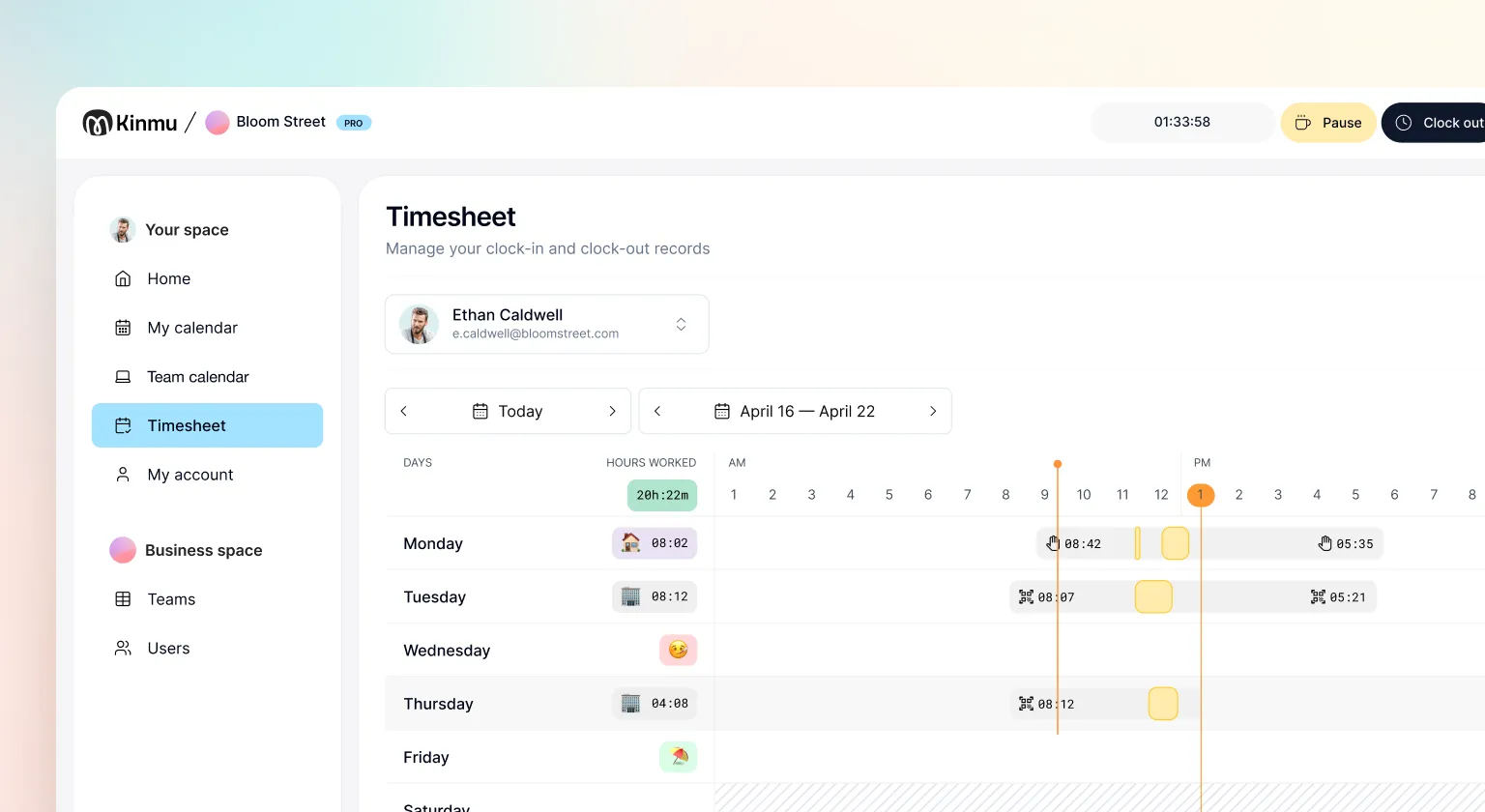
Once recorded, the time blocks appear in the manager’s panel in real time. At a glance you see who has started, who is on a break and who has finished, without asking anyone. That immediate visibility is what turns a pile of separate clock-ins into a clear, useful picture of the working day.
And from that same panel, the manager approves or rejects each person’s records with one click. If something does not add up and they would rather reject it, they can leave a comment explaining why, so the other person knows what to review. Questions are settled there and then, inside the tool, with no email chains and no conversations that get lost.
Records you can edit, always with a trail
Good digital time tracking has to allow for slips, because we all have a day when we forget to clock out. In Kinmu, records can be edited so that fixing that slip is quick and easy, without having to ask for favours or give a long explanation. The idea is that a moment of forgetfulness does not turn into a headache.
Only the person the record belongs to can edit it, for example to adjust the clock-out time they forgot to mark. The manager does not touch anyone’s data: their role is to approve or reject, not to rewrite. That way, everyone keeps control over their own hours. And here is the detail that puts everybody at ease: every change is recorded in full. It saves the date it was made, who made it and exactly which value was changed.
Clock-in methods that are easy to live with
A fair worry when you bring in time tracking is that it will feel intrusive or awkward. We take that seriously, so we design clock-in methods meant to support the work, not to watch over it. Clocking in with Kinmu takes seconds and each person does it naturally, without feeling monitored.
You have four routes available, and they all aim at the same thing: making it easy. From the web, ideal for anyone working at a computer; the mobile app, perfect for people who move around or work from home; scanning a QR code at the entrance; or a digital kiosk, which turns a tablet into a shared clock-in point for the whole team.
What matters is that none of these methods asks for sensitive data or needs complicated, expensive devices. Everyone clocks in with something they already know and already carry, and the record is organised the same way wherever it comes from. That naturalness is what makes people clock in without thinking about it, which is exactly when a time tracking system is really working.
Frequently Asked Questions
What is digital time tracking?
It is the automatic recording of employees' clock-in, clock-out and break times through software. It is a centralised, automated system, with a reliable timestamp, that you can reach from any device. It replaces paper and spreadsheets with data that organises itself.
What kind of businesses is digital time tracking for?
It suits almost any small or medium business: shops, workshops, offices, clinics, hospitality or field teams. It really comes into its own when you have several sites, staff turnover or a mix of on-site and remote work, because it brings all the information together in one tidy panel.
How does my team clock in with Kinmu?
Each person records their clock-ins, clock-outs and breaks with a gesture that takes seconds. The same action works to start the day, to finish it or to mark the beginning and the end of a break. Everyone picks the method that suits them best for the moment and the place.
Which clock-in methods does Kinmu offer?
Four: from the web, from the mobile app, by scanning a QR code at the entrance, or through a digital kiosk set up on a tablet. They all send the information to the same place, so the record is organised in the same way whichever method it comes from.
Can a record be edited if someone forgets to clock out?
Yes. Records can be edited so that fixing a slip is quick and simple. The person adjusts their own time, for example the clock-out they did not mark, without having to ask anyone for a favour. The correction is saved in full detail so the information stays reliable.
Who can change a time record?
Only the person the record belongs to. Managers do not rewrite anyone's data: their role is to approve or reject. That way everyone keeps control over their own hours and nobody alters someone else's records.
Are corrections recorded?
Yes, they are fully traceable. Every change saves the date it was made, who made it and exactly which value was changed. Nothing is altered behind the scenes, so trust stays intact even when adjustments are needed.
Can a manager approve or reject clock-ins?
Yes. From their panel they approve or reject each person's records with one click. If they reject one, they can leave a comment explaining why, so the other person knows what to look at. Questions get resolved there and then, inside the tool.
Can I see records in real time?
Yes. Once recorded, time blocks appear in the manager's panel in real time. At a glance you can see who has started, who is on a break and who has finished, without asking anyone or chasing messages.
Is digital time tracking intrusive for employees?
It does not have to be. Kinmu's methods are designed to support the work, not to police it. Clocking in takes seconds and feels natural, with no sensitive data required and no complicated devices to fit on the wall.


