
AI assistant for HR teams
Manage clock-ins, absences and leave with natural language. Kinmu's AI assistant understands what you need and acts instantly.
Benefits
- Request holiday or remote work by writing the way you speak
- Clock in and out from the chat
- Check your holiday and absence balance in seconds
- Managers approve or reject requests with a message
- Receive notifications when your team arrives or leaves
- Configure company policies with natural language (admin)
What is Kinmu’s AI assistant
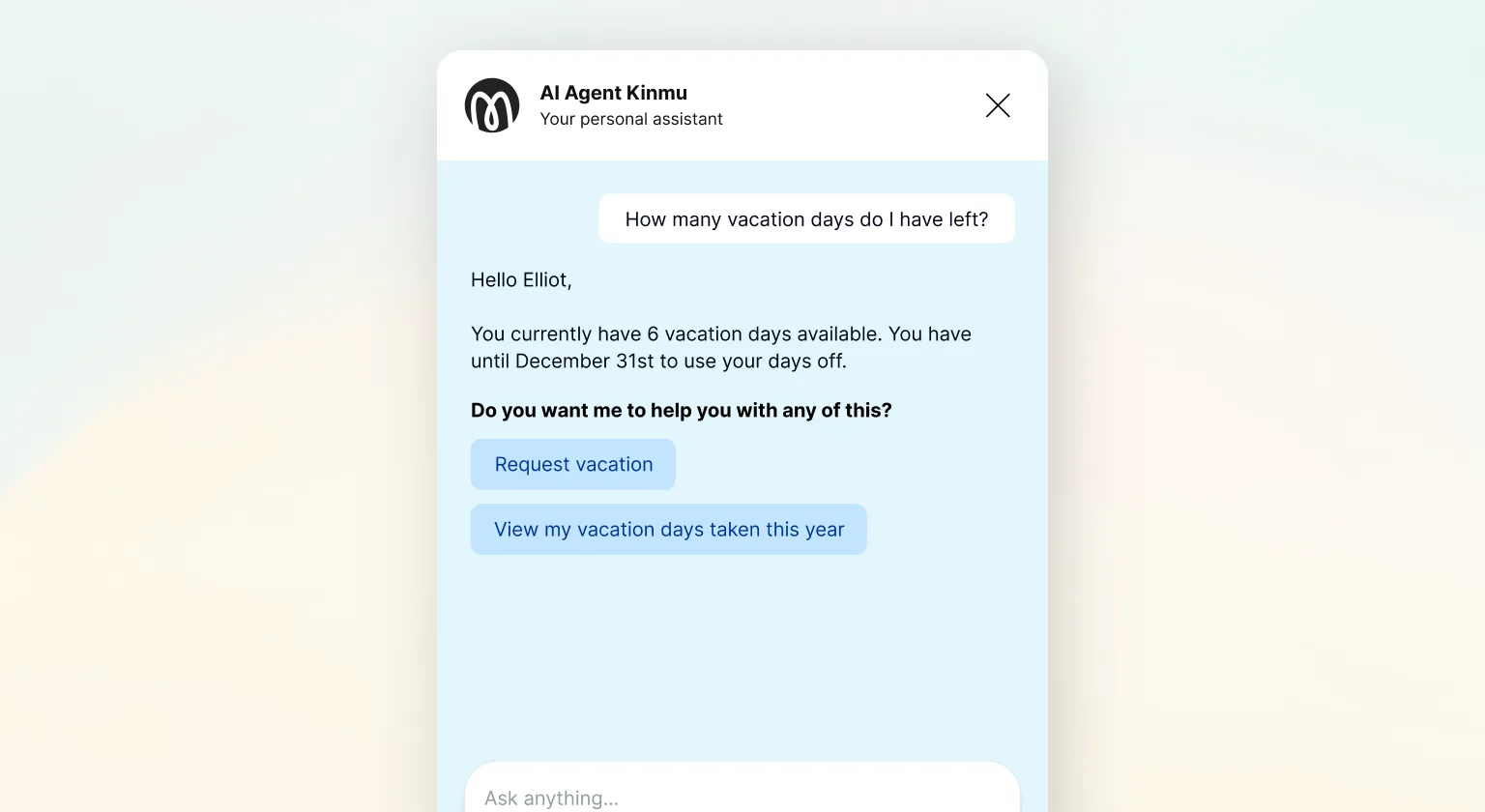
Kinmu includes an intelligent assistant you can talk to in natural language: “How many holiday days do I have left?” or “I want holiday next week”. No forms to fill in and no menus to browse: you write what you need and the system understands it, validates it and executes it.
It is not a chatbot with predefined answers. It is an agent integrated into the app that works with clock-ins, creates requests, checks balances and calendars in real time. One sentence replaces three screens.
What the assistant can do
For employees — Requests
- Holiday: “I want holiday from August 10 to 14” — the AI creates the request, checks your available balance and warns you if there is a conflict before confirming. If the balance is insufficient or there is an overlap, it shows it clearly and gives you the option to continue anyway or modify the request.
- Remote work: “Tomorrow I am working from home” — records the request while respecting your company’s configured remote work policy (maximum days per week, allowed days, location approval).
- Sick leave and permissions: sick leave, personal leave, training or others — all available types in a single chat.
- Cancel requests: “Cancel my holiday for next week” — the assistant identifies the correct request and cancels it after confirmation.
For employees — Clock-ins and queries
- Clock in and out: “Clock in” — the assistant records your clock-in instantly without leaving the chat.
- Holiday balance: “How many holiday days do I have left?” — up-to-date answer including requests still pending approval.
- Remote work balance: “How many remote work days do I have available this month?”
- Request status: “Which requests do I have pending approval?”
For managers
- Approve or reject requests: the AI assistant lists pending team requests and lets you resolve them with a message. You can approve one by one or all at once.
- Real-time team status: “Who is in the office right now?”, “Who has already clocked in this morning?”, “What absences does my team have this week?”
- Clock-in history: “What time did Ana start this week?” or “Show me Carlos’s clock-ins from last month”.
- Arrival alerts: “Notify me when Juan arrives” — notification as soon as that employee records their clock-in.
For administrators — (Company policy chat)
Kinmu also includes a separate chat to configure company policies. The admin describes changes in natural language, the AI assistant translates them into configuration, shows a visual summary of each proposed change and applies only after your explicit approval:
- Working schedules: active days, start/end times, break
- Remote work policy: maximum days per week, modalities
- Holiday policy: days per year, accrual, expiry
- Public holiday calendar: add, edit or remove days
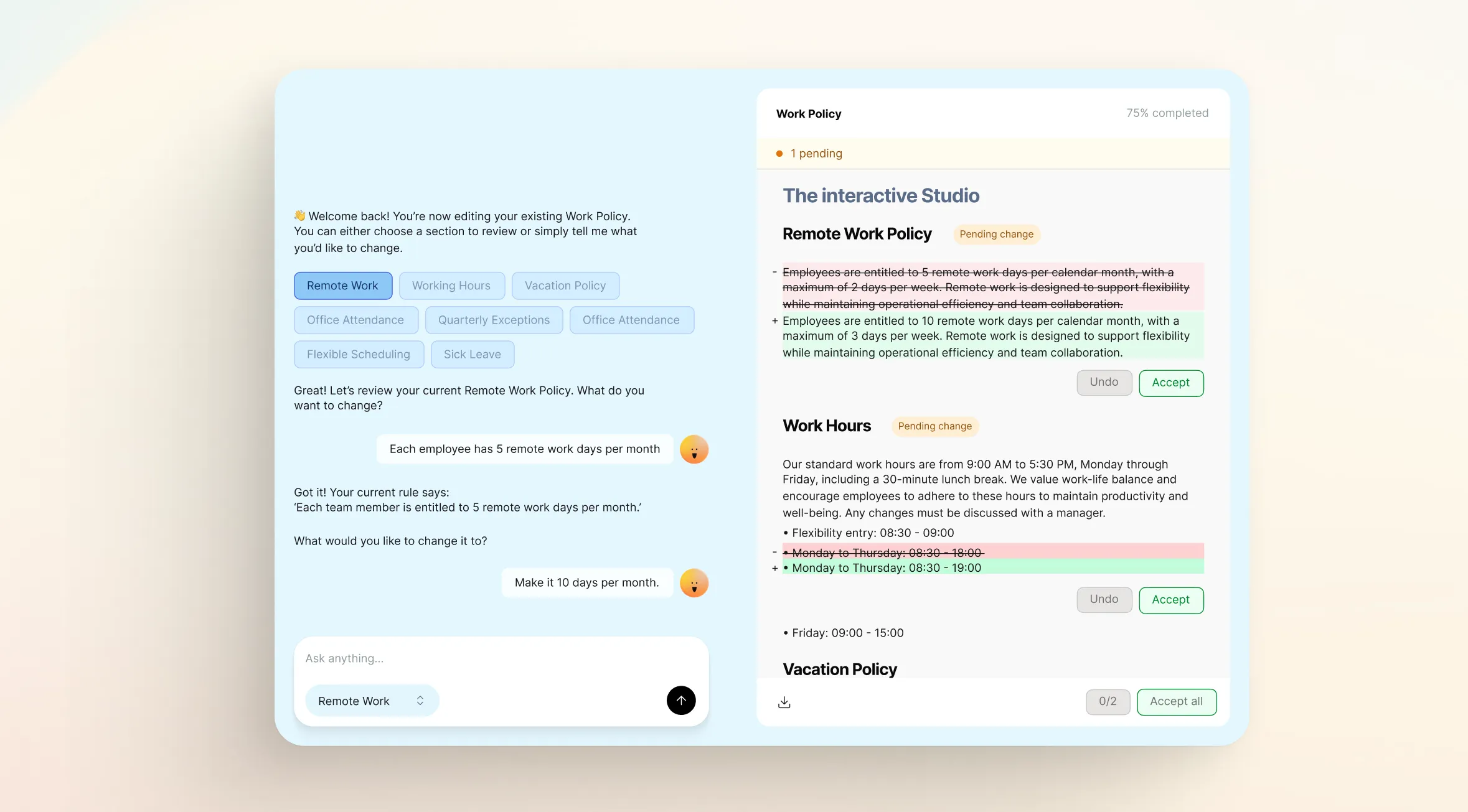
Everything is logged together with the date and the user who approved the change.
How it works
The AI assistant analyzes each message to understand the intent of each message and extract relevant information such as dates, names or absence types. Before executing any action, it verifies available balance, possible overlaps and the applicable policy. If any data is missing, it asks for the necessary information before continuing. In addition, it includes a continuous learning system that improves accuracy over time based on received feedback.
Native multi-language
The assistant responds in the user’s language. Kinmu is available in 9 languages: Spanish, English, German, French, Italian, Portuguese, Japanese, Dutch and Swedish. This is not just interface translation: the chat speaks in each person’s language, including mistakes, confirmations and quick replies.
Why Kinmu’s AI assistant is different
Most HR software on the market has no native AI: it has searches, filters and forms. Some add support chatbots that answer predefined questions, but they do not execute actions inside the platform.
Kinmu’s assistant is not a customer support module or a search layer. It is integrated directly with company data — shifts, balances, requests, clock-ins — and operates on it in real time. The practical difference:
- In other systems: the employee navigates to the holiday module, selects dates in a calendar, fills in a form and waits for an email confirmation.
- In Kinmu: they type “I want holiday for week 18” and in seconds the request is created, validated and the manager is notified.
For managers, the assistant groups pending requests, presents them with context and lets everything be resolved from a single conversation point — without jumping between modules.
The policy chat for admins also has no direct equivalent: configuring schedules, public holidays or remote work in natural language reduces onboarding time and allows quick adjustments without depending on technical support.
Your privacy, protected from the first click
You decide when to stop. Consent can be revoked at any time from account settings. If you decide to stop using the assistant, access is deactivated immediately. Work-time data is retained for the period required by law, but conversation history is taken out of circulation.
Your data belongs to you. Kinmu only manages the information so the service can work, but does not own that data. Your company’s information is not shared with third parties and is not used to train external AI models.
Start free with Kinmu and let the AI assistant make work easier →
Frequently asked questions about the AI assistant
Do I need to download an app to use the assistant? No. Kinmu’s AI assistant is integrated in the platform itself and works on any device — mobile, tablet or desktop. No installation needed.
Which languages are available? The assistant responds in the user’s language. Kinmu supports 9 languages: Spanish, English, German, French, Italian, Portuguese, Japanese, Dutch and Swedish.
Can the assistant make mistakes when managing my data? Before executing any action, the assistant shows a summary for confirmation. If there are conflicts — insufficient balance, overlaps — it flags them before acting. The user always has the final say.
Is chat data private? Yes. Access requires explicit GDPR consent. Chat data is not used to train external models. Consent can be revoked at any time.
See also: Absence Management in Kinmu


