
How do I check the status of my time-off request?
Open My Calendar in Kinmu and select a day of your request to see whether it is Pending, Approved, Denied or Cancelled.
On this page
On the web
Open My Calendar Open in Kinmu
Open My Calendar. Days with a request show a coloured dot under the date.
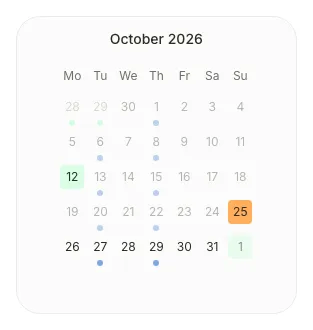
Open the day of your request
Select one of the days of your request.
After you select it: 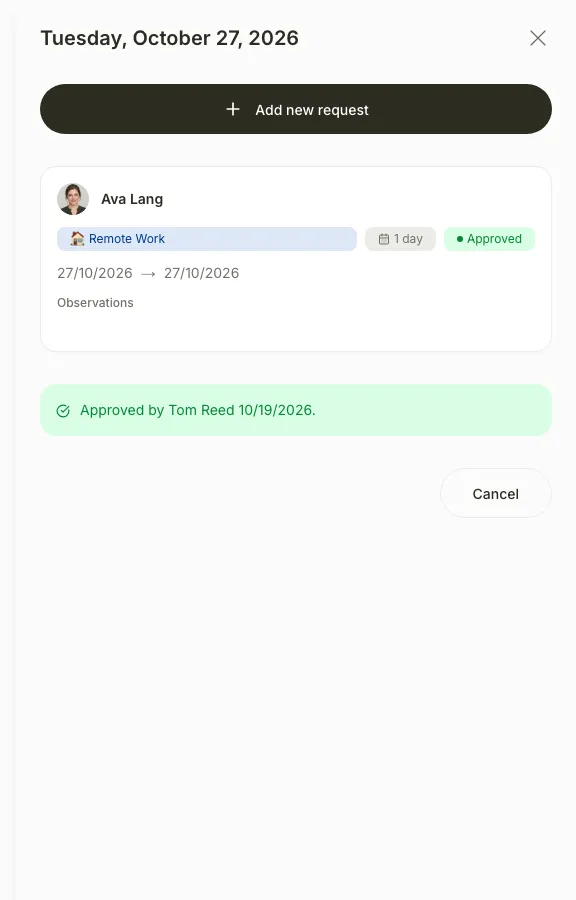
A side panel opens with your request and its status, Pending, Approved, Denied or Cancelled.
If you don’t see it
- On your phone, use the menu button to open the menu first.
- If you see “My calendar unavailable”, your company’s subscription is paused. Ask your manager.
- If you can’t find the request, check the year you are viewing in Filter results.
Common questions
Who approved or denied my request?
The request shows Approved by or Denied by with the name of the person who resolved it.
Can I cancel a request?
Yes, while it is pending or approved. Open the day and select Cancel on the request. You see “Request cancelled successfully”.
What if my request was denied?
Ask your manager why, or send a new request with other dates from New request.
Result
You know whether your request is still pending or has been approved, denied or cancelled.
Was this helpful?Thanks
Can't find it? Write to us