
How do I request time off?
Open My Calendar, create a new request, choose the absence type and dates, then send it for approval.
On this page
Step by step
- 0:02Request time off in Kinmu
- 0:08Open My Calendar
- 0:13Start a new request
- 0:18Choose the absence type
- 0:24Pick your dates
- 0:30Add a note
- 0:34Send the request
- 0:39Check balance and overlaps
Read the transcript
Need vacation, a remote day or a day off? In Kinmu you can request it in a minute. Open My Calendar. Here you see your requests and their status.
Select New request and the form opens.
In Absence type, choose Holidays, Remote Work or another option your company offers. In Dates, pick the first and last day. A single day works too.
If you like, turn on Observations and add a note for your manager. Select Create request. It shows up in My Calendar with its status. Can't request those dates? Check your balance or look for an overlapping request.
Requesting vacation and time off with Kinmu really is that easy.
On the web
Open My Calendar Open in Kinmu
On your phone, use the menu button to open the menu first.
Start a request
Select New request.
A form opens with Absence type, Dates and Observations.
Choose the absence type
In Absence type, select Holidays, Remote Work or another option available in your company.
After you select it: 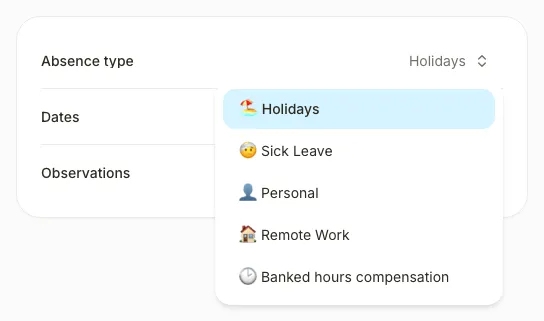
Set the dates
In Dates, select the day or range you need. On mobile, confirm with Select date.
After you select it: 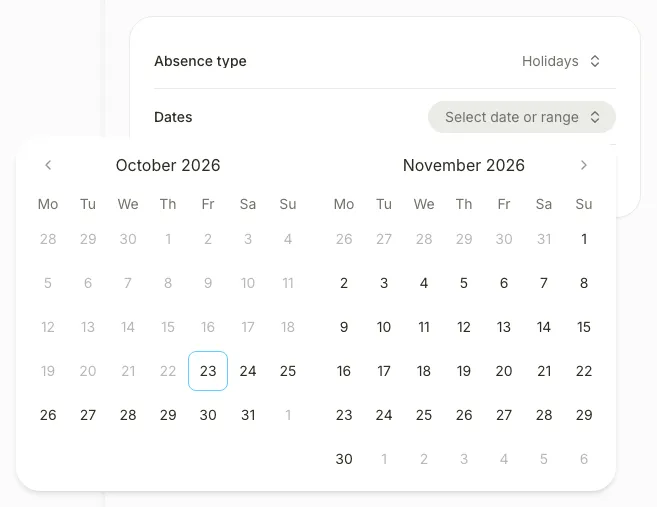
Add a note (optional)
Turn on Observations and type your note in Add observation.
After you select it: 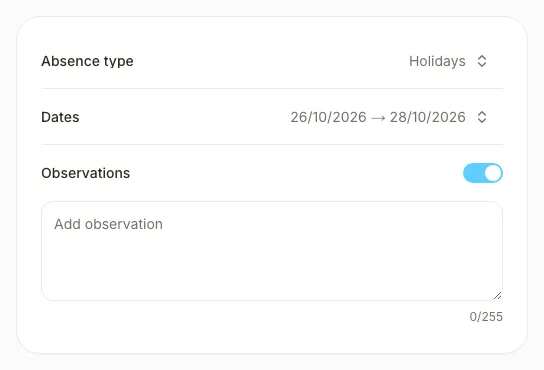
Send the request
Select Create request to send it.
The request appears in My Calendar with its status.
If you don’t see it
- If you see “You already have another absence request that overlaps these dates.”, choose dates that do not overlap that request.
- If you see “You don’t have enough available hours or days for this absence.”, check your balance or ask your manager.
Common questions
Where can I find my request?
Open My Calendar to see your request and its status.
Why can’t I request these dates?
You may have an overlapping request or insufficient balance for the selected absence type.
Result
Your request appears in My Calendar with its absence type, dates and status.
Can't find it? Write to us