
How do I see my calendar and upcoming shifts?
In Kinmu, your published shifts appear in Your shifts on Home, and My Calendar shows your holidays, absences and remaining vacation days.
On this page
On the web
Open Home Open in Kinmu If your company uses Shifts.
Open Home.
Your shifts lists your upcoming published shifts by date. Your next activity shows your upcoming activities.
After you select it: 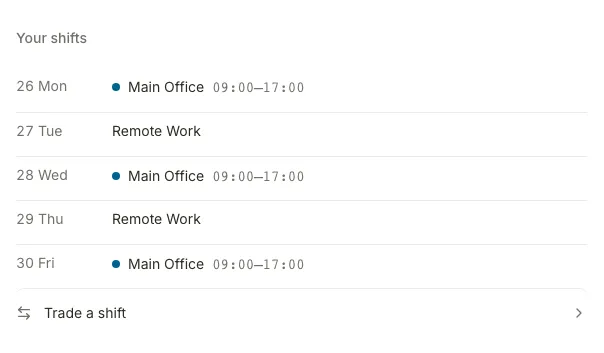
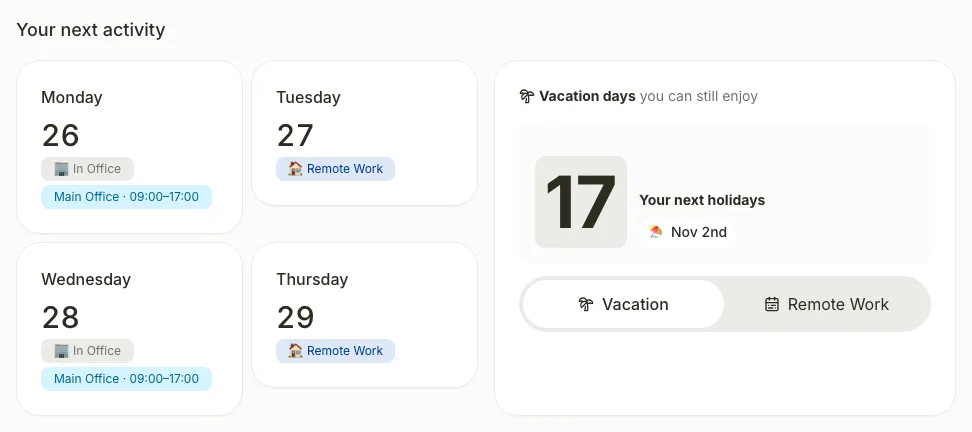
Open My Calendar
After you select it: 
Your calendar appears with your company’s holidays, your absences and the Vacation days you have left this year.
If you don’t see it
- On your phone, use the menu button to open the menu first.
- If Your shifts is missing, your company does not use the Shifts extension. Ask your manager for your work schedule.
- If you see “No shifts this week”, your manager hasn’t published shifts for you this week.
- If you see “We couldn’t load your shifts”, reload the page.
Common questions
Can I swap a shift with a coworker?
When you have a shift that can be traded, Trade a shift appears in Your shifts. Select it to request the swap.
Why don’t I see next week’s shifts?
Only published shifts appear. If you see “No more published shifts for now.”, your manager hasn’t published the next ones yet.
Result
You know which shifts you work this week and which days you are off.
Was this helpful?Thanks
Can't find it? Write to us