
How do I invite someone to my company?
In Kinmu, open Users, select Add new user, enter the person's name and email and select Send invitation. The person receives the invitation and appears in the Invitations tab.
On this page
On the web
Open Users Open in Kinmu
On your phone, use the menu button to open the menu first.
In the left menu, under Company space.
Start a new invitation
Select Add new user.
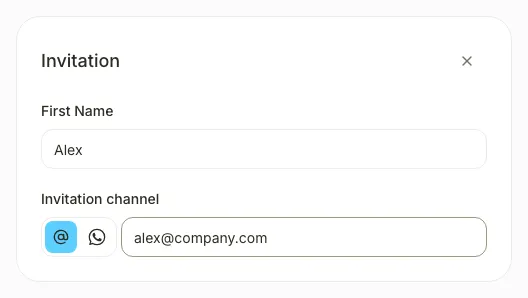
The Add new user panel opens with an Invitation card.
Enter the name
Complete First Name with the person’s name.
Enter the email
In Invitation channel, keep the email icon selected or choose WhatsApp, then enter the contact details.
Send the invitation
Select Send invitation.
After you select the button, you see that the person “has been successfully invited” and the panel closes.
“Users that accept invites will be included as additional seats on your next invoice.”
If you don’t see it
- Available to these roles within their permitted scope: Global Admin, Manager, Location Manager, Unit Manager, HR Manager.
- If you see “Already in the company”, that person already has an account in your company and no invitation is sent.
- For an existing invitation, open Invitations and choose Resend invitation or Delete invitation in its row.
- If you see “You can’t send invitations while a payment is pending.”, select Complete payment to settle it first.
Common questions
Can I invite several people at once?
Yes. Select Add another invitation in the panel to add one card per person, then send them all with Send invitation.
The person didn’t get the invitation. What can I do?
In Users, open the Invitations tab and choose Resend invitation in that person’s row.
Where do I set their location and team?
Once they accept, open their profile in Users and choose Assigned location and Team under Professional information.
Result
The person appears in the Invitations tab of Users with the status Pending and receives the invitation by email.
Can't find it? Write to us